Metronome practice programs

What is a practice program?

A practice program is a sequence of steps, each with its own tempo, number of bars and rhythm, that the metronome plays one after another, so you can change speed or feel without touching a control. Pick a ready-made one below, open it in the editor, change anything and save it.

Ready-made programs

Every program here is a real template in the app. Opening one only fills the editor: nothing is saved until you press Save.

Internal Clock

The click drops out for progressively longer sections. Hold the pulse internally and lock back in when the metronome returns.

  • 8 steps
  • 57 bars
  • about 3 min
  • 70 BPM
  • plays 3 times
  • 8 silent bars
Show all steps
  1. 70 BPM · 4 bars
  2. 70 BPM · 1 bar · silent
  3. 70 BPM · 4 bars
  4. 70 BPM · 2 bars · silent
  5. 70 BPM · 2 bars
  6. 70 BPM · 2 bars · silent
  7. 70 BPM · 1 bar
  8. 70 BPM · 3 bars · silent
Open in the editor — Internal Clock

Subdivision Ladder

Moves through quarter-note, eighth-note, triplet and sixteenth-note subdivisions over a steady pulse without losing the beat.

  • 7 steps
  • 112 bars
  • about 6 min
  • 70 BPM
  • plays 2 times
  • Subdivisions: eighths, triplets, and sixteenths
Show all steps
  1. 70 BPM · 8 bars
  2. 70 BPM · 8 bars
  3. 70 BPM · 8 bars
  4. 70 BPM · 8 bars
  5. 70 BPM · 8 bars
  6. 70 BPM · 8 bars
  7. 70 BPM · 8 bars
Open in the editor — Subdivision Ladder

Backbeat Groove

The metronome clicks only on beats 2 and 4. Feel beats 1 and 3 internally to develop a deeper backbeat, pocket and groove.

  • 10 steps
  • 120 bars
  • about 6 min
  • 60–100 BPM
  • plays 2 times
Show all steps
  1. 60 BPM · 4 bars
  2. 60 BPM · 8 bars
  3. 70 BPM · 4 bars
  4. 70 BPM · 8 bars
  5. 80 BPM · 4 bars
  6. 80 BPM · 8 bars
  7. 90 BPM · 4 bars
  8. 90 BPM · 8 bars
  9. 100 BPM · 4 bars
  10. 100 BPM · 8 bars
Open in the editor — Backbeat Groove

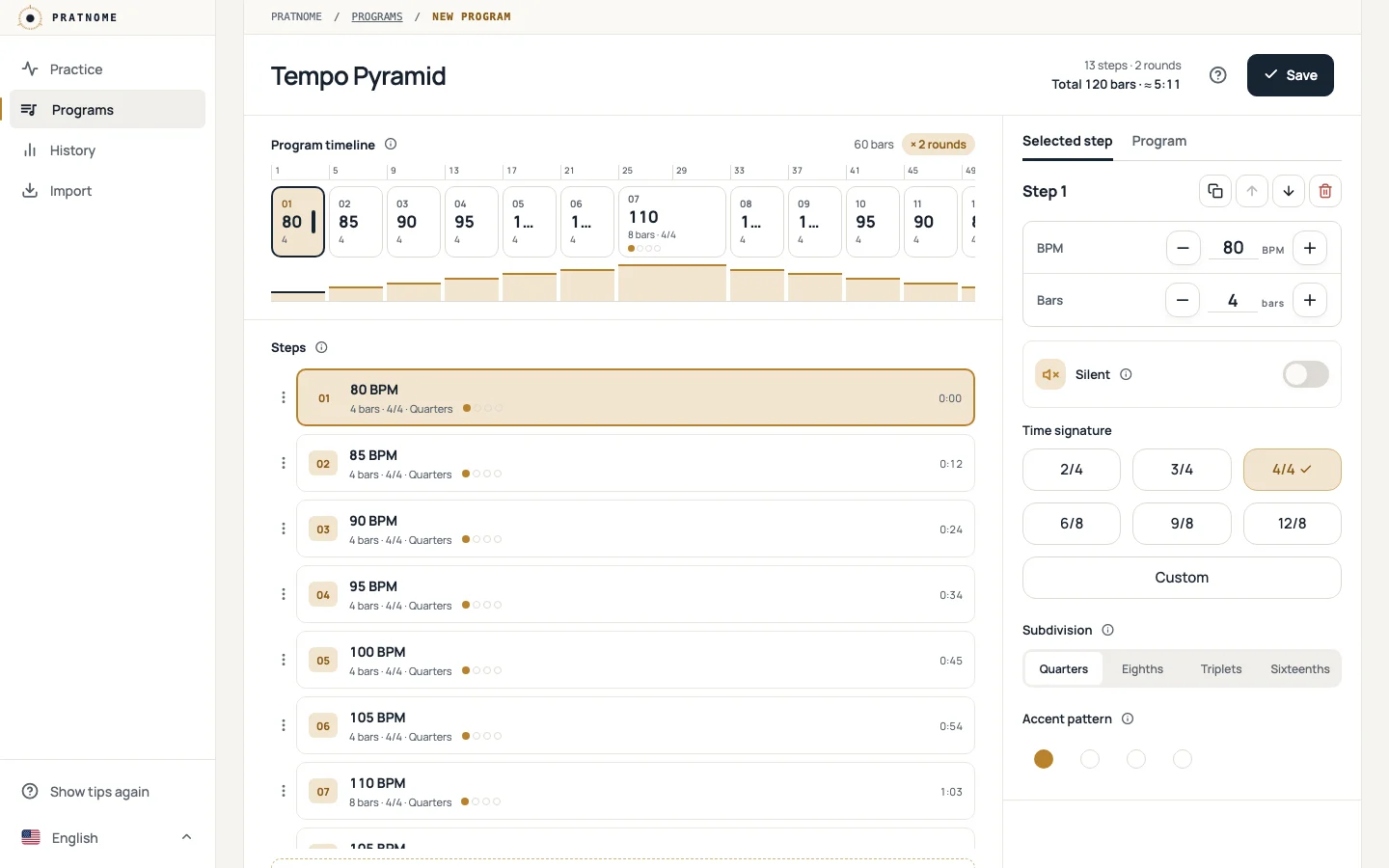
Tempo Pyramid

Gradually raises the tempo to a peak and brings it back down, training clean articulation, consistent timing and control across tempo changes.

  • 13 steps
  • 120 bars
  • about 5 min
  • 80–110 BPM
  • plays 2 times
Show all steps
  1. 80 BPM · 4 bars
  2. 85 BPM · 4 bars
  3. 90 BPM · 4 bars
  4. 95 BPM · 4 bars
  5. 100 BPM · 4 bars
  6. 105 BPM · 4 bars
  7. 110 BPM · 8 bars
  8. 105 BPM · 4 bars
  9. 100 BPM · 4 bars
  10. 95 BPM · 4 bars
  11. 90 BPM · 4 bars
  12. 85 BPM · 4 bars
  13. 80 BPM · 8 bars
Open in the editor — Tempo Pyramid

Wider means more bars, taller means faster. Dashed steps are silent.

Make it yours

Change anything

Edit the tempo, bars, rhythm, accents and silence of every step, reorder the steps or add new ones.

Save it

Your programs stay in this browser, and you don't need an account.

Share or back it up

Send a program as a link or code, or export all your programs to a file.

The program editor with the Tempo Pyramid template loaded: 13 steps, 120 bars and about five minutes in the header; the program timeline and step list on the left, the selected step's tempo, bars and rhythm on the right.
A template opened in the program editor.

Questions

Can I change a ready-made program?

Yes. Opening a template only fills the editor, so you can change any step before you save, and the template itself is never changed.

What does a silent step do?

A silent step plays no click for its bars, but the bars still count. It trains you to keep the tempo on your own and to land back on the beat when the click returns.

How is the time estimated?

From the tempo and number of bars of every step, on the same beat clock the metronome plays. The count-in and pauses are not included.